如果你满足以下条件,则可以继续往下看:前端使用vue并且想使用url访问图片资源后端使用springboot并且想把图片资源存储在resource下后端配置#application.yml#借鉴地址: https://blog.csdn.net/lorogy/article/de...
如果你满足以下条件,则可以继续往下看:
- 前端使用vue并且想使用url访问图片资源
- 后端使用springboot并且想把图片资源存储在resource下
后端配置
#application.yml

#借鉴地址:  https://blog.csdn.net/lorogy/article/details/103918934

spring:
  # 映射resource.static下文件,使之可以通过url地址直接访问
  mvc:
    static-path-pattern: /**
    @RequestMapping(value = "/uploadFile")
    public R uploadFile(MultipartFile file, HttpServletRequest request) {
        if (file.isEmpty()) {
            return R.error("图片文件为空");
        }
        String uuid;
        try{
            //上传
            byte[] bytes = file.getBytes();
            String fileSuffix=file.getOriginalFilename().substring(file.getOriginalFilename().lastIndexOf("."));
            uuid = UUID.randomUUID().toString()+fileSuffix;

            Integer length = getClass().getClassLoader().getResource("static/imageData/resource.txt").toString().length();
            String resourcePath = getClass().getClassLoader().getResource("static/imageData/resource.txt").toString().substring(6, length - 12);
            log.info("地址为:" + resourcePath);
            Path path = Paths.get(resourcePath + uuid);
            path.toFile().getParentFile().mkdirs();
            path.toFile().createNewFile();
            Files.write(path, bytes);
        }catch(Exception e) {
            e.printStackTrace();
            return R.error("上传失败");
        }
        return R.ok("上传成功").put("address", uuid);
    }
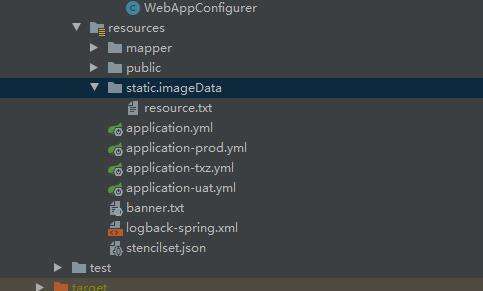
!!!最重要的(这里一定要创建imageData文件夹,并且创建resource.txt文件) ------imageData和resource.txt的名字可以随意更改,但是需要对应起来
解释说明: 之前找了大量资料,没办法自动获取resource下的路径,基本上手动写url的多一些,但是开发环境和线上环境的地址又不同,就很麻烦
解决办法: 通过getClass().getClassLoader().getResource()可以获取文件的绝对路径,而且还是自动的
浏览器访问
#示例
localhost:8001/imageData/9d1f3a13-5eb0-4b24-8a8c-ff20bb07ec31.jfif

#格式
后端接口地址/imageData/xxxx.xx
沃梦达教程
本文标题为:vue-springboot实现文件上传和下载(resource篇)


基础教程推荐








猜你喜欢
- 关于文字内容过长,导致文本内容超出html 标签宽度的解决方法之自动换行 2023-10-28
- vue离线环境如何安装脚手架vue-cli 2025-01-19
- JS前端广告拦截实现原理解析 2024-04-22
- CSS3的几个标签速记(推荐) 2024-04-07
- 浅析canvas元素的html尺寸和css尺寸对元素视觉的影响 2024-04-26
- this[] 指的是什么内容 讨论 2023-11-30
- 基于Vue制作组织架构树组件 2024-04-08
- 浅谈Vue2和Vue3的数据响应 2023-10-08
- Ajax实现动态加载数据 2023-02-01
- js禁止页面刷新与后退的方法 2024-01-08